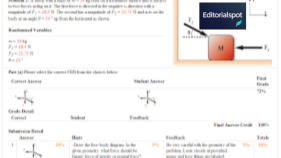

Expert TA has become a core part of homework for thousands of physics and math students in colleges and universities. If you’ve ever opened an assignment and felt overwhelmed by the strict grading, the unfamiliar interface, or the fear of losing points for small mistakes, you’re not alone. Many students quietly struggle with the platform, not because they don’t understand the subject, but because they don’t understand how Expert TA works. This article is designed to give you a clear, honest, and practical guide to using Expert TA more effectively, based on real student experiences, instructor insights, and information from academic sources that discuss digital learning systems.
The goal isn’t just to help you complete assignments—it’s to help you build confidence, learn more efficiently, and avoid unnecessary stress. With the right approach, Expert TA can shift from being an intimidating hurdle to a helpful tool that supports your understanding of physics, engineering, and mathematics.
What Expert TA Actually Does
Expert TA was built to give students a structured way to practice problem‑solving. According to various university learning resource centers and instructor documentation, its purpose is to provide step‑based homework that reinforces core concepts taught in lectures. Rather than simply giving right-or-wrong grading, the system breaks down answers into components, offering partial credit where possible. It is especially common in introductory physics because it encourages students to show understanding of units, significant figures, and reasoning rather than just memorizing formulas.
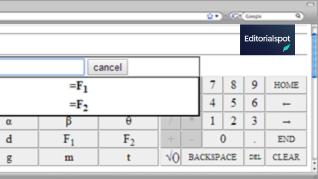
The platform includes symbolic input, diagrams, free-response formats, and multi-step reasoning questions. Instructors choose problem sets from a large question bank aligned with standard physics and engineering textbooks. This is why Expert TA assignments often mirror examples found in books like University Physics by Young & Freedman or Fundamentals of Physics by Halliday and Resnick.
If you understand these connections, the system feels less like a test and more like an extension of class learning.
Getting Comfortable With the Interface
A major reason many students struggle with Expert TA is simply unfamiliarity with the layout. When you open an assignment, you’re greeted with a workspace that includes the problem prompt, input fields, diagrams, and a feedback area. Taking a few minutes to explore each area carefully can significantly reduce frustration.
The assignment overview page lists all your problem sets, due dates, and progress indicators. Inside each problem, the workspace updates dynamically depending on the type of question. There may be text boxes, number fields, or interactive elements like vector diagrams. Understanding where everything is helps you avoid clicking the wrong button or misreading the instructions.
Small habits help a lot here. For example, maximizing the browser window gives more space for diagrams, while reading each prompt slowly prevents you from missing details that lead to unnecessary mistakes. Students who take the time to get familiar with the interface often report fewer lost attempts and a smoother overall experience.
Solving Problems Efficiently
Physics and engineering problems can be time-consuming, especially when each attempt matters. One of the most effective strategies is breaking problems into small, manageable steps. Start by rewriting key parts of the question in your own words. This simple technique has backing from cognitive science research on comprehension—summarizing helps you process ideas more deeply.
Always identify the known and unknown variables. Make note of what information is given explicitly and what must be derived from formulas. For many students, drawing a quick diagram or jotting down a free-body sketch helps build clarity before entering answers.
Next, think through the logic before typing anything into Expert TA. Because attempts can be limited, planning your approach avoids losing points on early mistakes. If the system offers hints, use them sparingly. Hints can be helpful but sometimes reveal too much, which reduces your chance to learn through reasoning.
Finally, double-check your units and significant figures. Expert TA is known for precise grading here—not because it’s picky for no reason, but because physics depends heavily on correct numerical representation. Students often lose points not for misunderstanding a concept but for forgetting to convert centimeters to meters or using too many decimal places.
Making the Most of Feedback
One of the most misunderstood features of Expert TA is its feedback system. Many students click “submit,” see a red X, and move on without reading the explanation. But the feedback is often just as important as the problem itself.
The platform may tell you if your answer is dimensionally incorrect, if the sign is wrong, or if you forgot units altogether. Learning from these messages is part of the process. This is essentially the digital equivalent of a teacher pointing out mistakes during office hours.
If you notice repeated errors, take a moment to step back and reassess the reasoning behind your approach. When the system signals conceptual issues—such as misunderstanding direction, vector components, or proportional relationships—it’s a valuable opportunity to reinforce foundational skills.
Treat each feedback note as a chance to adjust your thinking rather than as a punishment. Over time, this mindset shift can dramatically improve your problem‑solving abilities.
Study Habits That Improve Your Results
Successful Expert TA students usually share one trait: they prepare before starting an assignment. This doesn’t necessarily mean hours of studying—it simply means engaging with the material before opening the platform. Reviewing class notes, re-reading textbook examples, or solving one or two practice problems on paper can make the online work far easier.
Time management matters, too. Tackling an assignment all at once can create unnecessary stress, especially for harder sets. Breaking it into smaller chunks gives your brain time to process information, and studies on spaced learning show that spreading work over time improves retention and comprehension.
Another helpful habit is checking your work as you go. If you get stuck, step away for a moment or switch to another problem before frustration builds. Many students underestimate the value of short breaks, but they’re proven to help with cognitive reset, which leads to clearer thinking.
Finally, don’t hesitate to ask for help—from classmates, tutors, or instructors. Expert TA is not meant to be used in isolation. Most universities offer free tutoring services or online study groups that can explain concepts from different perspectives.
Common Mistakes Students Make
A lot of frustrations with Expert TA stem from predictable patterns, and simply being aware of them can help you avoid trouble.
One of the biggest issues is rushing through problems. When students treat the system like a quick quiz instead of a learning tool, they burn through attempts and miss out on understanding. Another common mistake is overlooking units. Physics relies heavily on proper measurement, and Expert TA enforces this to encourage good habits.
Many students also depend too heavily on hints. While hints can be helpful, relying on them for every problem reduces long-term learning. Misreading diagrams is another frequent issue, especially in vector problems or situations involving friction, forces, or displacement. Taking a moment to analyze diagrams carefully prevents misinterpretation.
If you can avoid these common pitfalls, you’ll have a much smoother experience and build stronger problem‑solving skills.
Helpful Features You May Not Know About
Expert TA includes several features that many students don’t notice at first. For example, some assignments allow unlimited attempts without penalty on certain question types. Instructors can also enable detailed solution breakdowns after deadlines, giving you a useful resource for exam preparation.
Another helpful tool is the ability to revisit earlier parts of a multi-step problem for context. Although the system sometimes locks earlier answers once the attempt limit is reached, you can still use the problem statement to guide later steps.
Additionally, many instructors embed supplementary notes or reference links within the assignment that students overlook. These resources often contain clarifications or formulas that make solving problems easier.
Taking a moment to explore these features can save you time and make your study sessions more productive.
Balancing Expert TA With Real Learning
While Expert TA is a powerful tool, it shouldn’t replace genuine understanding. The ultimate goal of homework is to build the skills you’ll need for exams, labs, and real-world applications. Think of Expert TA as a structured environment that pushes you to think carefully and apply concepts correctly.
But true learning also comes from discussion, practice outside the platform, and asking questions when something doesn’t make sense. If you find yourself guessing or relying on patterns just to get through assignments, step back and re-engage with the core ideas.
This balance between digital practice and real comprehension is crucial. Students who blend both approaches generally perform better on exams and develop stronger foundational knowledge that carries into advanced courses.
Final Thoughts
Expert TA can feel strict and sometimes frustrating, but with the right strategies, it becomes a valuable resource instead of an obstacle. By understanding its design, using feedback effectively, and adopting smart study habits, you can improve not only your homework scores but also your overall grasp of physics and math.
ou may alsYo read:Classroom 80x: Simple Ideas That Make Teaching Easier
FAQs
1. What is Expert TA used for?
Expert TA is an online homework system mainly used for physics and math courses. It helps instructors assign problem sets and gives students instant feedback while they work.
2. Why does Expert TA deduct points even for small mistakes?
The system is designed to teach accuracy. Small details like units, rounding, or missing steps matter in real problem‑solving, so the platform grades them closely.
3. How can I avoid losing attempts on Expert TA?
Take a moment to read the question fully, check units, and review your steps before submitting. Slowing down a bit often prevents repeated errors.
4. Are the hints on Expert TA helpful?
They can be useful, but they’re best used sparingly. Hints should guide your thinking—not replace it—so rely on them only when you’re genuinely stuck.
5. Can Expert TA actually improve my grades?
Yes. When you use the feedback and approach each problem thoughtfully, the practice translates to better understanding and higher test performance.